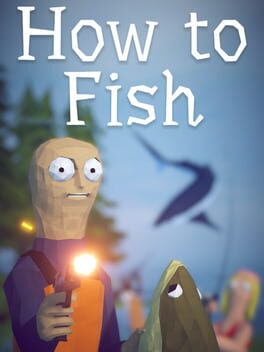
How to Fish
2026 · Shooter · Simulator · Indie
- PC
- Overall
- 69
- 13 ratings
- Players
- 69
- 13 ratings
How to Fish is an indie, shooter, and simulation game developed by Dazed Games. It came out on August 20, 2026 on PC.
It has a score of 69/100 on IGDB from 13 critic and player ratings.
Open in TrishUpdated · Data from IGDB.com
How to Fish release date
| Platform | Date |
|---|---|
| PC | · Worldwide |
How to Fish languages
All languages (15)
| Language | Interface | Subtitles | Audio |
|---|---|---|---|
| English | Yes | Yes | Yes |
| Spanish (Spain) | Yes | Yes | Yes |
| Chinese (Simplified) | Yes | Yes | Yes |
| Chinese (Traditional) | Yes | Yes | Yes |
| French | Yes | Yes | Yes |
| German | Yes | Yes | Yes |
| Italian | Yes | Yes | Yes |
| Japanese | Yes | Yes | Yes |
| Korean | Yes | Yes | Yes |
| Polish | Yes | Yes | Yes |
| Portuguese (Brazil) | Yes | Yes | Yes |
| Russian | Yes | Yes | Yes |
| Swedish | Yes | Yes | Yes |
| Turkish | Yes | Yes | Yes |
| Ukrainian | Yes | Yes | Yes |
About How to Fish
A 1-4 player physics based fishing simulator. While drinking and boating you suddenly crash into a small island. To work your way back home you have to learn How to Fish.
Description from IGDB.com.
- Developer
- Dazed Games
- Publisher
- Dazed Games
- Genres
- Shooter, Simulator, Indie
- Themes
- Action, Comedy
- Game modes
- Single player, Multiplayer, Co-op
- Perspective
- First person
How to Fish screenshots


Games like How to Fish







Keep exploring
- Ranking Best games of 2026 The year's ranking by critic and player score, also by platform. See the list
- Calendar November 2026 releases What's coming out this month, day by day and by platform. See the list
- Coming soon Most anticipated games The upcoming games with the most hype and their release dates. See the list
- Free Free games this week Active free games and giveaways on Epic, Steam, GOG and more. See the list
- PlayStation This month's PS Plus games The Essential monthly games and the latest Extra and Premium additions. See the list
- Xbox Game Pass news What's coming to Xbox Game Pass and what's leaving. See the list
Frequently asked questions
When did How to Fish come out?
How to Fish came out on August 20, 2026 on PC.
What platforms is How to Fish on?
How to Fish is available on PC.
What languages is How to Fish available in?
Text is available in 15 languages, including English, Spanish (Spain), Chinese (Simplified), Chinese (Traditional), and French. Voices are in English, Spanish (Spain), Chinese (Simplified), Chinese (Traditional), and French.
Is How to Fish multiplayer?
Yes. Besides single player, it has multiplayer and co-op, so you can play it with friends.
How do I add How to Fish to my backlog?
With Trish, the free app for iOS and Android: search for How to Fish, mark it as backlog, playing or finished and keep track of your hours.
Track How to Fish with Trish
Add it to your collection or backlog, mark it as backlog, playing or finished. Free on iPhone, iPad and Android.